NuPhy Air75 V3 Review: Soft Typing and a Sound Worth Hearing
The Air75 V3 combines a low front edge with a yielding keypress and a rounded typing sound. We tried Red nano, Brown nano and silent Blush nano, and Brown was the one we wanted to keep typing on.
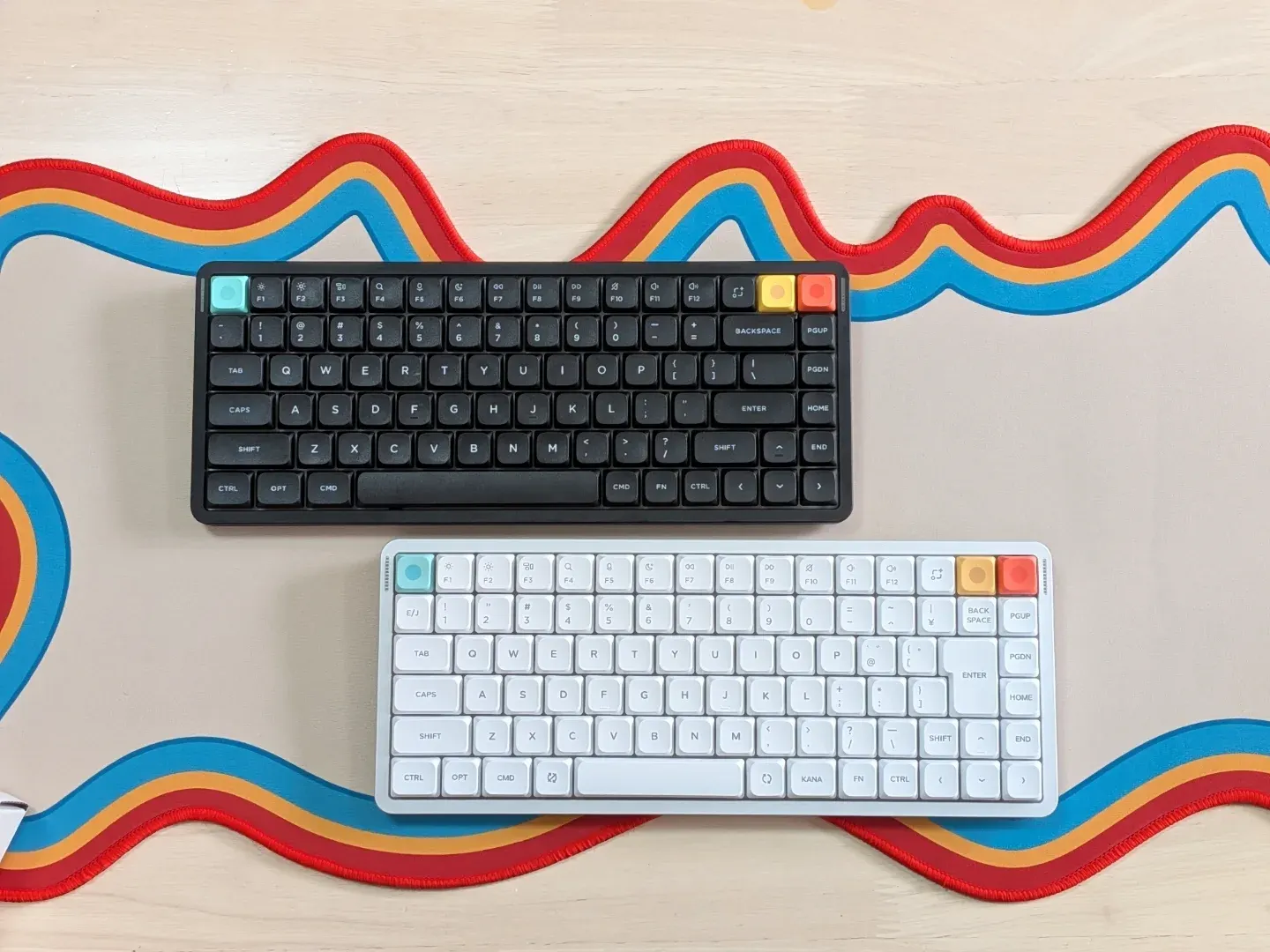
A low-profile board I wanted to keep typing on
NuPhy and DIGIART supplied the keyboards for tenpapaTV’s original review. This English article adapts that hands-on test, first published in October 2025.
The Air75 V3’s sound was the first thing that caught my attention. There was a rounded, hollow little knock to each press, with more body than I usually expect from a thin keyboard. Then I pressed into the keys and felt the plate give beneath my fingers. The combination made this one of my favorite low-profile typing experiences at the time of the review.
I tried the standard Air75 V3 with all three stock switch choices, including a Japanese JIS-layout unit, and compared it with a Lofree Flow 2. The Air75 V3 felt softer to me, and its sound had more of the rounded character I enjoy. Brown nano brought that out best.
The review below comes from those original units and recordings. The newer Moonbow colorway has its own changes, which we cover in the Moonbow Edition news story.
What is the NuPhy Air75 V3?
The Air75 V3 is a low-profile wireless mechanical keyboard with a compact 75% layout. You keep the function row, arrow keys and a small navigation column. Its aluminum top sits above an ABS bottom case, and a gasket-mounted polycarbonate plate gives the keys room to move.
The front edge was low enough for me to type comfortably without a wrist rest. I measured about 738 g for one review unit and roughly 750 g for the JIS board, while NuPhy’s current specification lists 724 g for the standard model. It was easy to pick up with one hand and carry between desks.
The box includes a cable, a keycap/switch puller, a screwdriver, layout-dependent extra keycaps, and both tall and low-profile knob modules. The corner position arrives as a normal key, so the knob in a product photo is a configuration you can install yourself.
| Feature | Details |
|---|---|
| Layout | 75%; 84 keys in ANSI, with JIS and regional ISO options |
| Case / plate | Aluminum top, ABS bottom / polycarbonate plate |
| Mount | Gasket |
| Switch options tested | Red nano, Brown nano, Blush nano |
| Connections | USB-C, 2.4 GHz wireless, Bluetooth 5.0 |
| Advertised polling rate | 1,000 Hz wired and 2.4 GHz; 125 Hz Bluetooth |
| Battery | 4,000 mAh; up to 1,200 hours with lights off, per NuPhy’s lab test |
| Typing angles | 4°, 8° or 10° |
| Configuration software | NuPhy IO |
Manufacturer specifications checked November 19, 2026. Layout, weight and included extra keycaps depend on the version. Battery runtime was not independently measured.
A soft keypress with a rounded knock
The plate visibly flexed when I pressed down, and that movement carried through to normal typing. Compared with the Flow 2 beside it, the Air75 V3 had more give under my fingers. If you like a soft landing at the end of a stroke, that is a large part of its appeal.
The sound also felt more substantial than the flatter clack I often associate with low-profile boards. I preferred the restrained resonance of the aluminum-and-plastic case to the more metallic character I heard from the Flow 2. The case volume and gasket movement may contribute to that impression, but the review did not isolate their effects in a controlled acoustic test.
I measured a stock keycap at about 1.5 mm thick. The ANSI boards use double-shot PBT, while the original video’s description corrects the JIS keycaps to dye-sublimated PBT. The legends on the tested boards do not let the backlight shine through. RGB comes through the spaces around the keys instead, and I thought it stood out especially well against the black version.
Red nano, Brown nano or Blush nano?
Brown nano was my pick. The tactile board had the clearest version of the rounded sound I liked, with Red nano next. Blush nano serves a different priority by reducing the main typing noise. Choose it for a quieter desk, with the spacebar behavior in mind.
The dedicated video below contains the three stock-switch recordings. In the original review, Red nano was in a white standard-layout board, Brown nano in a black board, and Blush nano in the JIS board. These are complete keyboard configurations, so the recordings also include their layout and keycap differences.
| Switch | Type | My impression |
|---|---|---|
| Red nano | Linear | A smooth option that retains the rounded typing sound. |
| Brown nano | Tactile | My favorite for the sound and the feeling of each press. |
| Blush nano | Silent linear | Quieter main keys; the spacebar remained more noticeable. |
The silent switch’s spacebar still needed attention
The stabilizers were visibly lubricated, and their stock tuning generally sounded good to me. On the Blush nano board, though, the spacebar still made a sharper, slapping sound, especially when I pressed it firmly. That stood out more against the quieter surrounding keys.
I tried an O-ring under the spacebar, and the difference was easy to hear in the review. It reduced the impact sound, but it also left the key sitting a little higher. The original video shows the experiment at around 24:33, including the before-and-after recording. It is a tradeoff I would judge by feel as well as sound.
A corner key that swaps for a knob
I liked having a knob, and the swap was straightforward. Remove the nearby keycaps to expose the retaining screw, undo it with the supplied driver, and exchange the corner module. Refit the screw and the surrounding keys. Returning to a normal key uses the same process, with the switch fitted into its module.
NuPhy includes two knob heights. The taller one was easy for me to grip, while the flatter one is convenient when packing the board. You can choose between the two without opening the whole case.
Mac styling, a JIS option and three connection modes
The legends and function-row design lean strongly toward the Mac. Windows is supported, and the included alternative keycaps help with the modifier labels, but I would choose this board partly for that Mac-oriented appearance. Physical selectors let you change the operating-system setting and connection mode.
One small setup detail is easy to miss. The connection selector needs to be in the wired position for USB use. Leaving it off kept the board inactive even with a cable connected. For wireless use, the 2.4 GHz receiver stores in the case, and Bluetooth is another option.
The white JIS unit gave Japanese-layout users an option beyond ANSI. Its right-hand keys are tightly packed, so I would check the actual layout photograph if you rely on particular Shift or punctuation keys. Regional layout choices also depend on the color and switch configuration.
I also tried placing the board directly over a laptop’s built-in keyboard. That particular setup did not sit properly without extra support. NuPhy advertises AirFeet compatibility with many laptops, but I would check the fit on the actual machine you plan to use.
NuPhy IO was easy to use, with one hold-action limit
With the keyboard connected by cable, NuPhy IO gave me a clear way to remap keys. Click a key in the diagram, then choose its assignment. Function-key assignments provide access to another layer of actions, and the advanced settings include tap, hold and double-tap behavior.
I could assign Enter to a tap and End to a hold, and adjust how long the press needed to be to count as a hold. The combination I wanted was more demanding. I often use Enter on tap and Control plus Shift on hold, and I could not assign that combined hold action in the version I tested.
That limitation mattered in my own workflow. These observations describe the original review’s software test; I have not repeated that assignment in the current NuPhy IO release.
What I would check before buying
- Switch compatibility. The board uses the Gateron Low-profile 3.0 system. Check an exact replacement switch’s fit before buying a set, as low-profile switches use different footprints and heights.
- Case preference. The standard Air75 V3 combines aluminum and ABS. The Flow 2 appealed more to me for its simple aluminum exterior, while I preferred the Air75 V3’s sound and softer keypress.
- Visible gaps around the keys. I could see parts of the switches through the space above the case. I would prefer a more enclosed appearance, particularly on the quiet configuration.
- Budget and layout. The original review quoted US$139.95 for ANSI and US$149.95 for JIS on NuPhy’s global store, and ¥28,600 at DIGIART. The Japanese figure is historical. Check the current configuration, shipping and taxes before ordering.
How does the Moonbow Edition fit in?
Moonbow gives the Air75 V3 frosted polycarbonate keycaps, an aluminum top over a polycarbonate bottom, and an all-white Blush Nano Glint Edition switch. NuPhy’s listing specifies ANSI US English and a US$149.95 price. The company describes a run of 2,000 units.
Those material changes matter when reading a sound review. My impressions above are from the standard PBT-keycap, ABS-bottom boards. NuPhy says Glint Edition keeps the familiar Blush Nano feel, but that does not establish how the whole Moonbow keyboard sounds. See the Moonbow Edition news story for the edition’s design changes and current buying details.
Verdict
I would choose the Air75 V3 for its soft keypress and rounded sound, and Brown nano would be my first pick. It felt satisfying enough that the thin profile stopped being the main reason to use it. The compact size, adjustable feet and easy knob swap made it practical as well.
Blush nano makes more sense when keeping noise down takes priority, though I would listen to the spacebar recording first. I would also check any essential tap-and-hold assignments before committing to NuPhy IO. With those preferences accounted for, this is a low-profile board I enjoyed a great deal.
Use the Air75 V3 product page to compare configurations and find buying options.
NuPhy Air75 V375% low-profile wireless mechanical keyboard · standard modelWatch the original tenpapaTV review
The Japanese-language video includes the unboxing, the knob swap, NuPhy IO setup and the comparison with the Lofree Flow 2.