Vintage Cherry MX Brown vs. Hyperglide Brown
What changed between vintage Cherry MX Brown switches and Hyperglide Browns? Compare the stems and housings up close, and learn what affects the tactile bump, scratch, and typing sound.
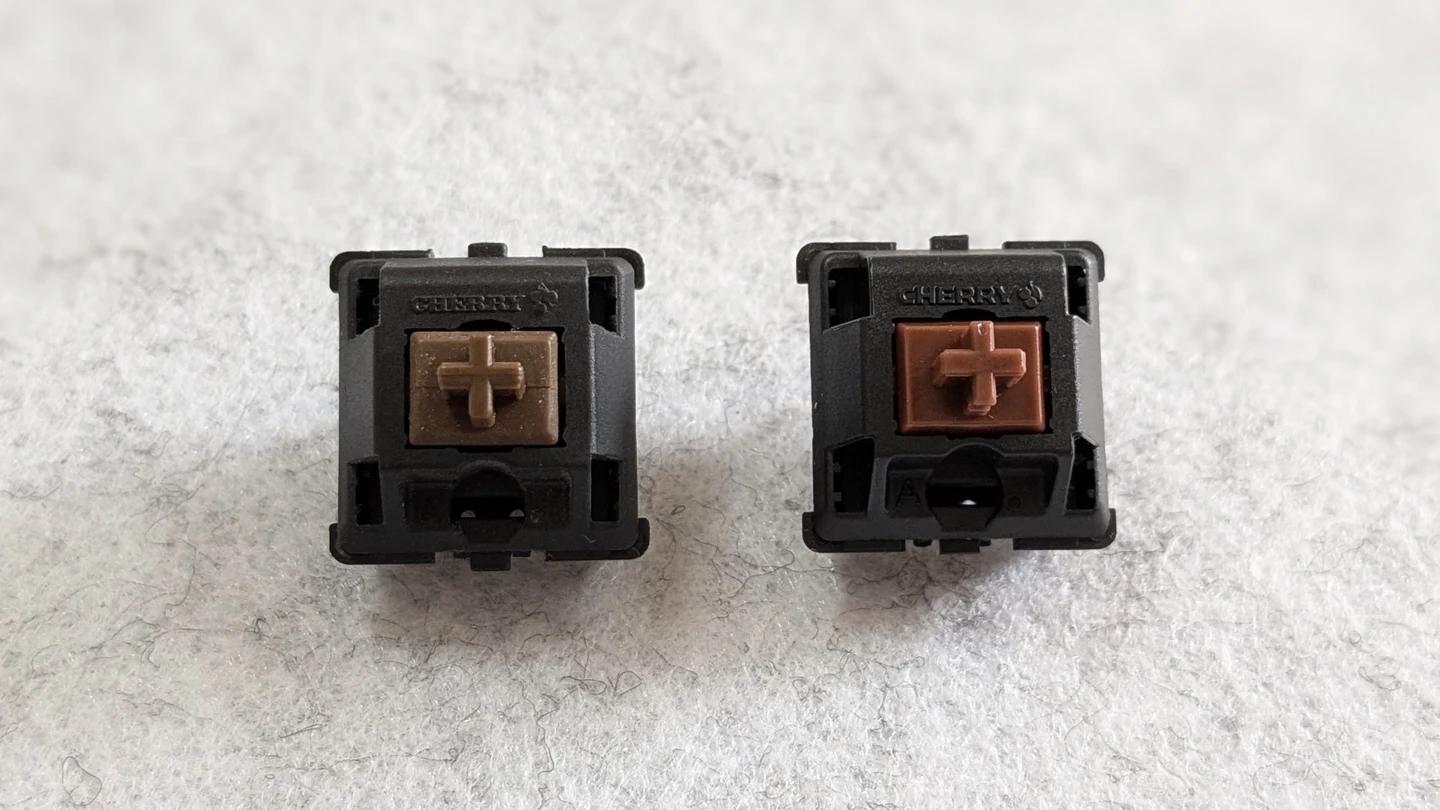
What do Vintage and Hyperglide mean?
Vintage Cherry MX Brown and Cherry MX Hyperglide Brown share the light tactile bump of MX Brown. Cherry dates its linear MX Black to 1984. According to Kinesis, Cherry first made MX Brown to its specifications in 1992, eight years later. Collectors use Vintage Brown for early Brown production, often found in older keyboards. The two switches have different production histories, so a collector’s date cutoff for Vintage Black does not automatically apply to Vintage Brown.
Cherry announced Hyperglide in 2020 for MX Brown, Black, Red, and Speed Silver. The update enlarged a sliding surface on the stem that works with eight guide rails inside the top housing. Cherry raised the rated life of the updated switches from 50 million to more than 100 million actuations. The rating describes the updated design’s durability when new. A harvested switch’s remaining life depends on its condition and history.
| What to compare | Vintage MX Brown | MX Hyperglide Brown |
|---|---|---|
| What the name means | Collector shorthand for early production | Cherry’s 2020 MX update |
| Switch feel | Light tactile. Wear and sample condition can change the feel. | Light tactile. The update revised how the stem is guided. |
| Best evidence for identification | Donor keyboard, date, and photos of original parts | Documented batch or packaging that specifies Hyperglide |
Where Retooled MX Brown fits
Tooling refers to the molds used to form the switch parts. Enthusiasts use Retooled for batches made after a mold revision and Pre-Retooled for batches made before that revision. Xe_ry’s 2018 photos below show how the labels were used for three generations of the linear MX Black.
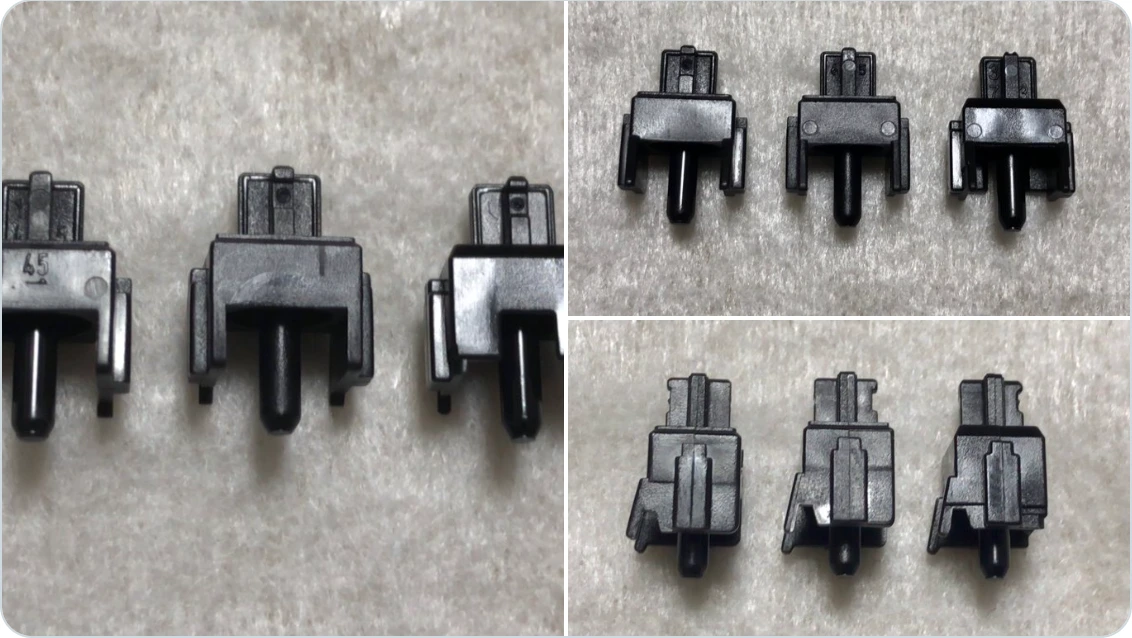
Retooled Brown before Hyperglide
By 2019, Retooled Browns were on sale. In a Reddit post comparing MX stems, Cherry MX’s marketing manager identified the revised stem on the right and pointed readers to a retailer selling Retooled Browns. The exact date when Brown production switched to the revised molds remains unclear.
Cherry announced Hyperglide the following year. When an older listing says Retooled Brown, check whether it refers to the earlier mold revision or explicitly identifies the 2020 Hyperglide update. In orangeosh’s Brown comparison, even the two stems labeled Retooled have different shapes. If you are trying to identify a loose switch, use the photos alongside the keyboard or batch it came from.
What the stem and housing photos show
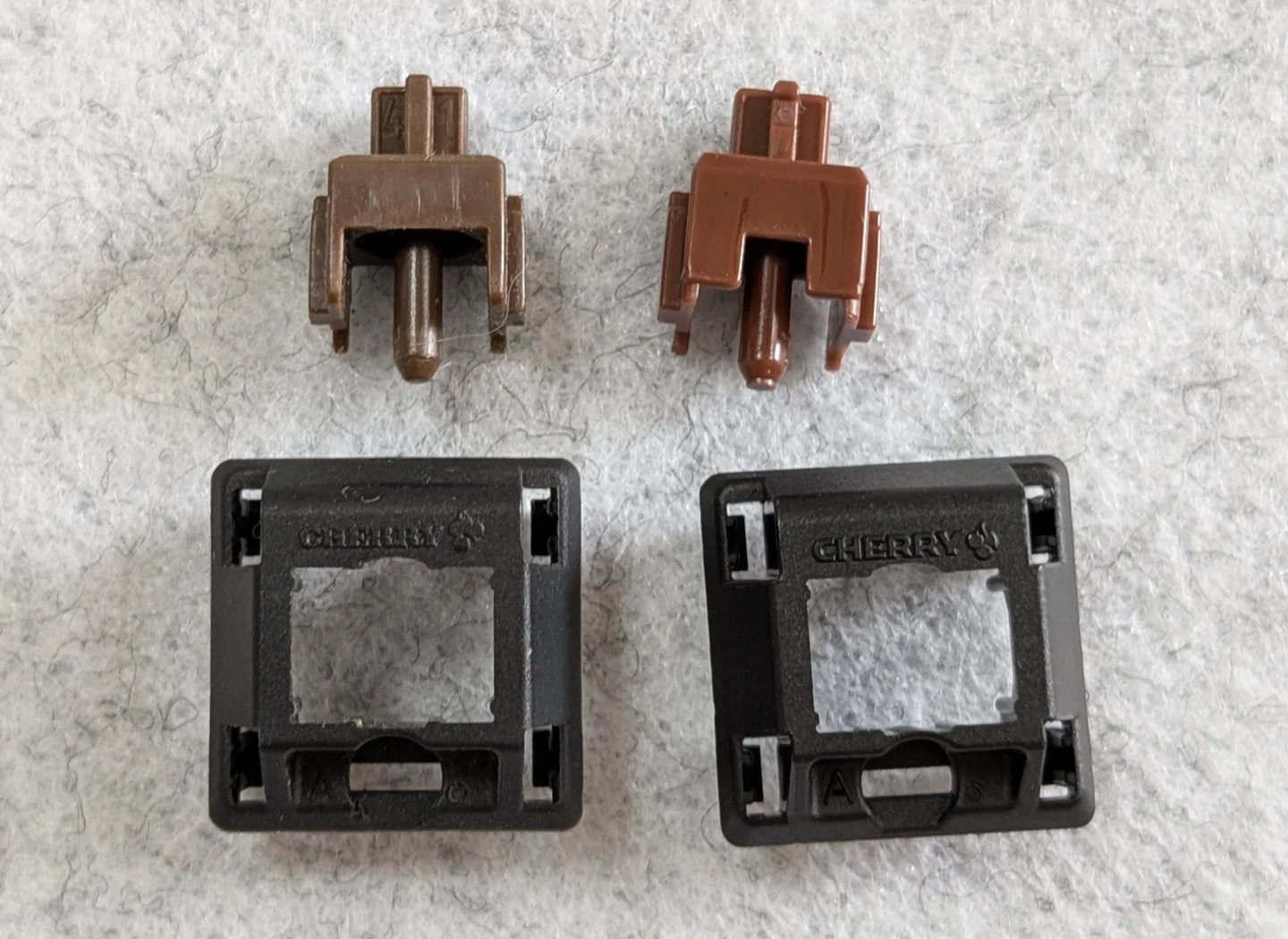
The disassembled samples reveal a difference that is easy to miss from above. The Vintage Brown stem on the left has a wider opening around the center pole. The Hyperglide Brown stem on the right has a narrower slot, with more plastic extending down beside the pole. The stem colors differ, and the pictured Hyperglide top housing has a more prominent CHERRY imprint and a visible A mold mark.
These are useful clues when comparing the two pictured switches. Start with the donor board or batch history when identifying another pair. Stem color varies with lighting and production, mold marks can vary, and a previous owner may have swapped stems or housings. A photo of this face also leaves the contact-leaf side of the stem out of view, so it cannot tell you how pronounced the tactile bump will feel.
Typing feel: tactile bump and scratch
Press slowly and pay attention to two sensations. The tactile bump is the brief rise and drop in resistance as the stem leg moves past the contact leaf. Scratch is the grainy texture you may feel as the stem moves. A switch can have an easy, smooth stroke and still give you a distinct bump.
Some enthusiasts describe older Browns as smoother or more tactile than later samples. Treat those impressions as reports about specific switches. On a harvested board, frequently used keys may feel different from seldom-used keys. Break-in, cleaning, lubrication, and spring swaps can all change the comparison. Hyperglide’s revised guidance is a documented design change. The shape and strength of the bump in any two samples are best judged side by side.
Vintage Brown vs. Hyperglide Brown typing sounds
The video below compares Vintage Cherry MX Brown and Cherry MX Hyperglide Brown in one recording. Listen for the impact as each key bottoms out, the sound as it returns to the top, and any quieter scratch or spring noise in between. The case, plate, keycaps, microphone placement, and typing force can all affect what reaches the recording.
What to check before choosing a batch
- For vintage MX Brown, ask for the donor keyboard model and date label, photos of the original switches, and details on cleaning, desoldering, or replacement parts.
- For Hyperglide Brown, look for a batch identified as MX1A Hyperglide. A generic Cherry MX Brown label can cover several revisions. Cherry’s 2023 MX2A launch also mentions Hyperglide technology, along with further changes such as factory lubrication and a new spring design on supported variants.
- Try several switches from each batch with the same keycap and mounting position. Check the bump on a slow press and the sound at your usual typing speed.